Friday, December 20, 2013
Monday, November 25, 2013
6-Evaluation
Once the new system has been implemented and is in full use, the system should be evaluated (this means that we take a long, critical look at it).
The purpose of an evaluation is to assess the system to see if it does what it was supposed to do, that it is working well, and that everyone is happy with it
.
How is a System Evaluated?
The systems analyst will use a number of techniques to evaluate the system...
Check against the
Requirements Specification
If you remember, earlier on in the Systems Analysis, the old system was analysed, and a checklist of targets was drawn up for the new system.
This list was called the Requirements Specification.
The systems analyst will use this document to check the new system. Going through therequirements one-by-one the analyst will check if they have been met.
This list was called the Requirements Specification.
The systems analyst will use this document to check the new system. Going through therequirements one-by-one the analyst will check if they have been met.

Check the
Users' Responses
Users' Responses
It is essential to get feedback from the usersof the system...
- Do they like it?
- Does it make their work easier?
- What, if anything, could be improved?
- Questionnaires
- Interviews
- Observations

5- Documentation
There are two types of documentation that should be produced when creating a new system:
- User documentation
- Technical documentation
Testing
Documentation
Implementation
User Documentation
The user documentation is intended to help the users of the system.
The users are usually non-technical people, who don't need to know how the system works. They just need to know how to use it.
User documentation usually includes:
The users are usually non-technical people, who don't need to know how the system works. They just need to know how to use it.
User documentation usually includes:
- List of minimum hardware and software required to use the system
- How to install the system
- How to start / stop the system
- How to use the features of the system
- Screenshots showing the system in typical use
- Example inputs and outputs
- Explanations of any error messages that might be shown
- A troubleshooting guide
The technical documentation is intended to help the maintainers of the system (the people who need to keep the system running smoothly, fix problems, etc.)
The maintainers are usually technical people, who need to know exactlyhow the system works.
Technical documentation usually includes:
The maintainers are usually technical people, who need to know exactlyhow the system works.
Technical documentation usually includes:
- Details of the hardware and software required for the system
- Details of data structures (data types, field names, etc.)
- Details of expected inputs
- Details of validation checks
- Details of how data is processed
- Diagrams showing how data moves through the system
- Flowcharts describing how the system works
3- Testing and development
A test plan is usually written whilst the system is being developed. The test plan will contain details of every single thing that needs to be tested.
A typical test would contain:
- Details of what is being tested
- The test data to use
- What is expected to happen when the test is performed
When is the System Tested?
Testing is normally done in two stages...
The first phase of testing is done by the designers and engineers who created the system, usually before the system is delivered to the customer.
The test data that is used in this first phase is similar to data that would be used by the actual customer.
The second phase of testing is done after the system has been delivered and installed with the customer.
The data used in the second phase is usually 'live' data - data that is actually part of the customer's business / organisation.What Happens if the System Fails Some Tests?
The first phase of testing is done by the designers and engineers who created the system, usually before the system is delivered to the customer.
The test data that is used in this first phase is similar to data that would be used by the actual customer.
The second phase of testing is done after the system has been delivered and installed with the customer.
The data used in the second phase is usually 'live' data - data that is actually part of the customer's business / organisation.What Happens if the System Fails Some Tests?
The whole point of testing is to try and find areas that don't work as they should, or areas that can be improved.
If any failures are found, the systems analyst goes back and does some further research, analysis and design to fix these areas.
2- Design
Using the list of requirements, the systems analyst now has to design the new system.
In most cases the new system will be computer-based. The ease with which computers can communicate and process data means that are usually the best tool for the job.
Analysis
Design
Testing
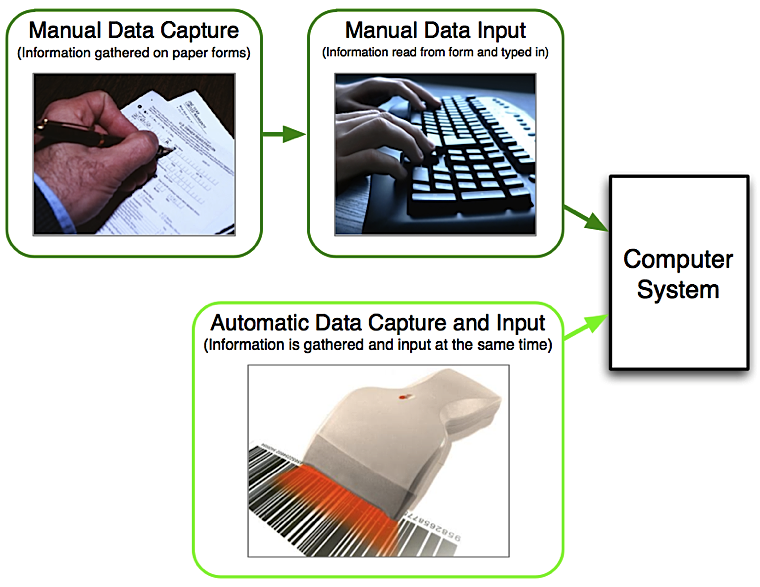
Designing the System Inputs
To get data into a system is a two-part process:
- Data must first be ‘captured’ (collected in a way that then makes it easy to input)
- Data must be input into the computer


System
analysis
Systems Analysis is, as the name states, the analysis of systems!
The systems that we are talking about are the systems within organisations and businesses - systems of communication, financial systems, manufacturing systems, etc. - basically the systems that make the organisation or business work.
A person who analyses systems is known as a Systems Analyst.
Often systems analysts are employed by organisations of businesses to help them improve their systems and so become more efficient, and for businesses, more profitable.
A systems analyst would generally perform the following steps in the order shown...
The systems that we are talking about are the systems within organisations and businesses - systems of communication, financial systems, manufacturing systems, etc. - basically the systems that make the organisation or business work.
A person who analyses systems is known as a Systems Analyst.
Often systems analysts are employed by organisations of businesses to help them improve their systems and so become more efficient, and for businesses, more profitable.
A systems analyst would generally perform the following steps in the order shown...
Production
Creating the new system from the design. (Note: details of this stage are not required for IGCSE)
Sunday, October 27, 2013
**Using spreadsheets**
What are spreadsheets modeling?
Spreadsheet modeling is a computer
program that allows you to create, edit and maintain full data in industries
like financial services, customer services etc. It can be used in industries to
check how much is made, what is leftover and what is lost. Types of spreadsheet
models include bank or debt analysis, Business Planning etc.
List three uses of spreadsheets.
**Spreadsheets
can also be used to produce graphs and charts from the data you input into the
different cells.
**Spreadsheets
are sometimes useful for sorting data either alphabetically or numerically, or
by some other variable.
What does a cvs. File stand for?
Comma separated values.
Sunday, October 20, 2013
| ***Patriotism*** |
Patriotism is a cultural attachment to one's parent homeland, excluding differences caused by the dependencies of the term's meaning upon context, geography and philosophy. In a generalized sense applicable to all countries and peoples, patriotism is a devotion to one's country. It is a related sentiment to nationalism.
Monday, September 23, 2013
ISBN check digit
n.b. this page shows the check digit calculation for the modern 13-digit ISBN. It is a different calculation to that for the old 10-digit ISBN.
Every ISBN number contains a check digit. It is the final single character of the ISBN. In the case of the old 10-digit ISBN the check digit can be any number from zero to nine, and it can also be a letter "x", like a Roman ten. In the case of the current 13-digit ISBN, then it could be any single digit from zero to nine.
What The ISBN Check Digit Is For
The check digit in an ISBN number is there to help prevent errors in transmission. When an ISBN number is read and entered into any system that is used to deal with ISBNs, such as a book cataloguing system, whether the ISBN is entered by hand or by means of a bar code scanner, the check digit as read from the entered number is compared to a check digit calculated from the remainder of the ISBN that has been entered. If the two check digits are the same, then there is a good chance that the complete ISBN, all of its digits, has been read correctly.
As an example, if I enter the ISBN 9781861972712 into a system that uses ISBNs, it will take the first twelve digits (978186197271) of the ISBN and calculate the check digit for that series of twelve digits. It will come up with the number 2 as the correct digit and compare it to the number that I entered earlier, and find that I entered the number 2 as well. In that case, the chances are I entered the digits correctly. However, supposing I entered the ISBN incorrectly and made a mistake by transposing the fifth and sixth digits, entering the ISBN as 9781681972712. When the system calculate the check digit for 978168197271 it will come up with 8 as the check digit for that number. It will compare 8 with 2 and know that a mistake of some sort has been made. It won't know where the error is, only that something is wrong.
Another example. Perhaps this time I misread a digit and enter the ISBN as 9781861973712. The system would calculate the check digit for 978186197371 as the number 9. Again, 9 does equal 2 - something wrong.
The ISBN check digit system is not completely foolproof, and will not catch all such errors, but will trap many.
How The ISBN Check Digit Is Calculated
In the previous section I calculate the check digit for a couple of example ISBNs, but didn't show my working! We'll put that right now and show the calculation for the correct number, and for both of those numbers that I entered with errors.
This is the process:
- Take the first 12 digits of the 13-digit ISBN
- Multiply each number in turn, from left to right by a number. The first digit is multiplied by 1, the second by 3, the third by 1 gain, the fourth by 3 again, and so on to the eleventh which is multiplied by 1 and the twelfth by 3.
- Add all of the 12 answers.
- Do a modulo 10 division on the result from step 2. (Don't know what a modulo 10 division is? It's easy. It's just the remainder from a whole number division by 10. I bet you learned to do that in junior school, before you even learned about decimal fractions.)
- Take that remainder result from step 4.If it's a zero, then the check digit is zero. If the remainders isn't zero then subtract the remainder from 10. The answer to that is your check digit.
First Example - correct ISBN - 9781861972712
First 12 digits x their multipliers = the results
9 x 1 = 9 7 x 3 = 21 8 x 1 = 8 1 x 3 = 3 8 x 1 = 8 6 x 3 = 18 1 x 1 = 1 9 x 3 = 27 7 x 1 = 7 2 x 3 = 6 7 x 1 = 7 1 x 3 = 3
Add the results:
9 + 21 + 8 + 3 + 8 + 18 + 1 + 27 + 7 + 6 + 7 + 3 = 118
Modulo 10 the result:
118 modulo 10 = 110 remainder 8
Work out the check digit:
8 doesn't equal zero, so check digit = 10 - 8 = 2
Compare the calculated check digit (2) with the one we first entered (2). They are the same, so looks like we have a good ISBN.
Next example - transposed digits - 9781681972712
Notice how the fifth and sixth digits have been swapped around compared to the good ISBN in the first example.
First 12 digits x their multipliers = the results
9 x 1 = 9 7 x 3 = 21 8 x 1 = 8 1 x 3 = 3 6 x 1 = 6 8 x 3 = 24 1 x 1 = 1 9 x 3 = 27 7 x 1 = 7 2 x 3 = 6 7 x 1 = 7 1 x 3 = 3
Add the results:
9 + 21 + 8 + 3 + 6 + 24 + 1 + 27 + 7 + 6 + 7 + 3 = 122
Modulo 10 the result
122 modulo 10 = 12 remainder 2
Work out the check digit
2 doesn't equal zero, so check digit = 10 - 2 = 8
Compare the calculated check digit (8) with the one we first entered (2). They are not the same, so looks like we have a bad ISBN.
Sunday, September 22, 2013
What are the factors that the analyst must consider when designing an input and output screens and forms?
The analyst must consider some factors like:
1- It should be easy to use.
2- It should look attractive.
3- It should limit the possibility of inaccurate data which is entered.
4- The use of lots of different colors & fonts should be avoided.
5- The screen design must contain guidelines to workers.
6- It should allow the user to navigate from a screen to another without difficulties.
7- It should not be over-elaborate.
Subscribe to:
Comments (Atom)